Imagine deleting something that you can not recover later. You don’t want to be in a scenario where you or someone else have deleted Azure resources accidentally and it impacts your project and company’s business. You must have read this ‘Better Safe than Sorry’. Well, that is the answer to why we should lock the resource groups in Azure because there is no way to recover Azure Resource groups after its deleted. Once deleted, everything inside that resource group will be deleted. So, be very careful, before deleting it.
I like this functionality where system will ask you to type the resource group name to confirm that you really want to delete it. However, still anyone with right access can delete it.

To avoid deletion of resource groups, we can set up Locks in Azure portal. As shown below, Locks can be found in left Navigation pane of resource or a resource group. Click on Add button and provide Lock name, note and Lock Type. Read-only is used when both modification and deletion should not be allowed and Delete lock type will be selected when you want to permit modification on resource/resource group but not deletion.
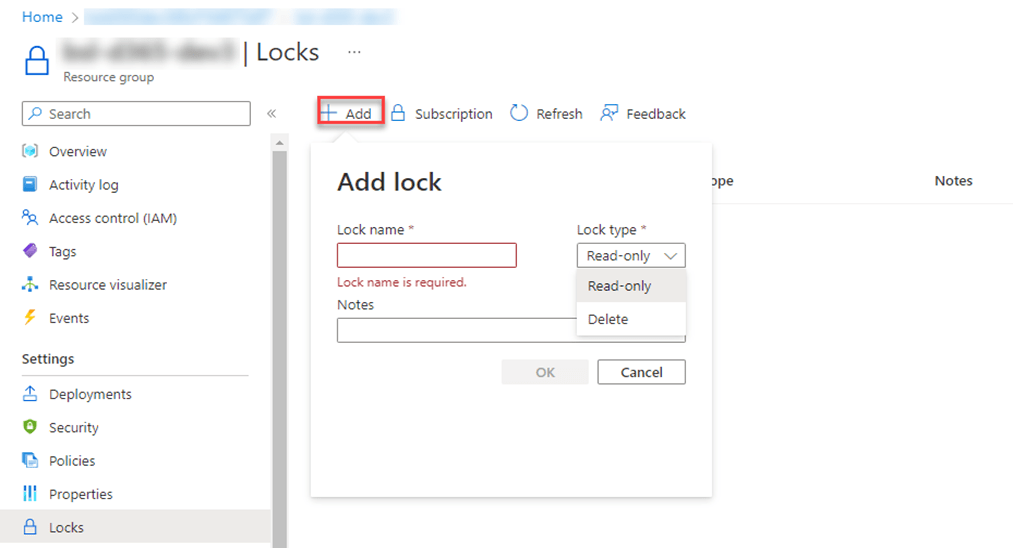
Now, if someone tried to delete that resource group, the below error will be thrown by system.

To test further, I created a storage account within the resource group where I have setup the Delete Lock. When I tried to delete this storage account, system gave me this error. Therefore, we can say that the lock is working correctly.

I would suggest creating a new resource group and resource to practice the above exercise and don’t use your project resources. Happy Learning!
 MOHIT RAMPAL - DYNAMICS 365 F&O BLOG
Leave a comment