Microsoft has made significant progress on One Version strategy. The strategy is to get all customers on the same software version which will enable Microsoft to fix known issues for all customers more quickly. Proactive Quality Updates fall under One Version umbrella.
Quality updates are cumulative builds of hotfixes. They don’t include new features. Proactive quality updates are applied monthly, and the related notifications are posted in the Microsoft 365 Message Center. Customers are notified at least five days before a proactive quality update is applied to an environment. Customers can’t cancel or postpone proactive quality updates. Proactive Quality updates does not change service updates.
Proactive Quality Updates enables businesses to receive updates for their software without any downtime. These updates are automatically applied to a test environment before being deployed to the production environment, allowing businesses to test the updates before they go live. This ensures that any issues are identified and resolved before they can affect the production environment.
Benefits of Proactive Quality Updates
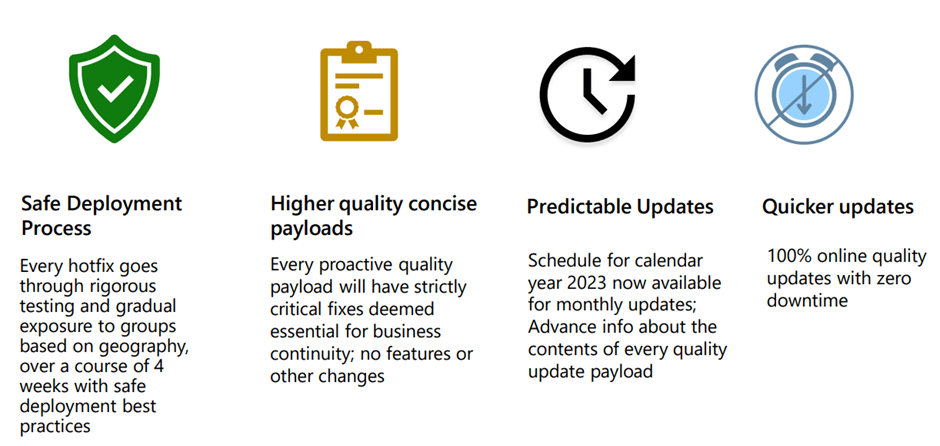
Proactive quality updates gets applied if current application version is lower than the PQU published application version. Microsoft will skip the update if the environment’s current build version is equal or higher than the quality update in question. These updates are not applied on Cloud hosted environments or On-Premises environments.
Microsoft has defined Dark hours for all Azure regions. The updates will be done during dark hours, with near-zero downtime. You can find more details on Dark hours from this Microsoft Learn link planned maintenance window.
Proactive quality updates will be rescheduled/skipped in case of below events.
- Skipped – Service update scheduled within a week.
- Skipped – Target environment has same or higher build version than the quality update.
- Rescheduled – Contention with a pre-scheduled action, for example a Point In Time Restore (PITR).
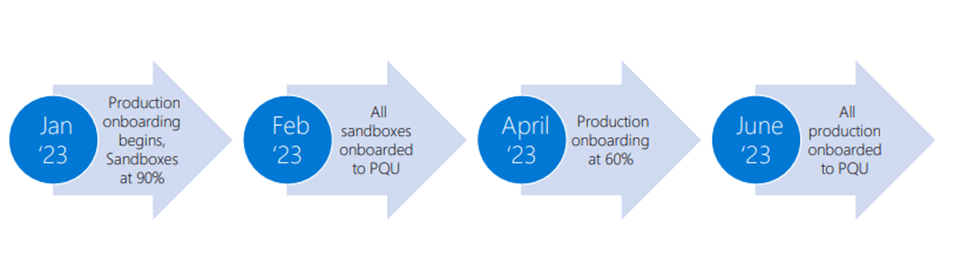
Proactive Quality Updates Schedule
Tips to be prepared for Proactive Quality Updates
- Keep Track of update release schedule and have a plan to implement it in a timely manner.
- Impact analysis on your customizations and third-party solutions (ISVs) will be crucial.
- Regularly review the release notes of updates to identify the areas for testing.
- As always, in case of issues raise Microsoft support ticket.
To sum up, Proactive Quality Updates allows businesses to stay current with the latest features and improvements without the need for a major upgrade, reduces the risk of downtime and helps to ensure that the software is running at its best. Customers and implementation partners also need to be proactive in testing the updates in Sandbox environments to ensure updates are not impacting their solutions.
You can go through below links if you wish to learn more on this topic
 MOHIT RAMPAL - DYNAMICS 365 F&O BLOG