Feature callout is a standard functionality to raise awareness about new capabilities to users while they are using the product. You might have seen pop up messages from system like below screenshot. These messages are controlled by feature callout functionality.
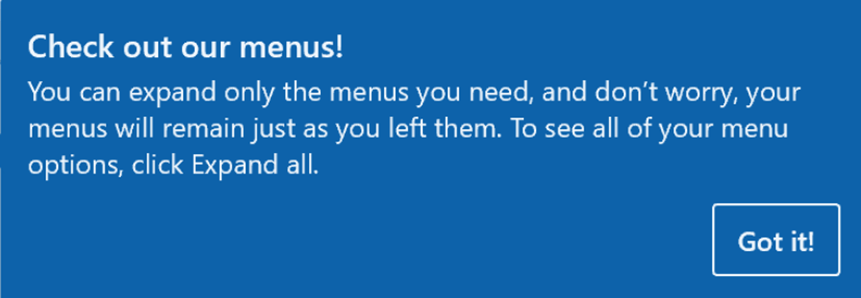
Feature callout functionality is available from Platform update 26. Feature callouts can be used to highlight capability to a user and optionally provide a hyperlink for users to learn more about the feature.
User can dismiss the pop up using the Got it! button in above screenshot. All the history of this button clicks is saved in personalization subsystem, which prevents that specific feature callout from being triggered again.
Please note that clearing personalizations will not delete the state of all previously dismissed feature callouts. Instead, separate actions have been added to reset all feature callouts so that they fire again. These actions are located on the Personalization tab on the Usage data page as well as on the Manage per user tab on the Personalization page.
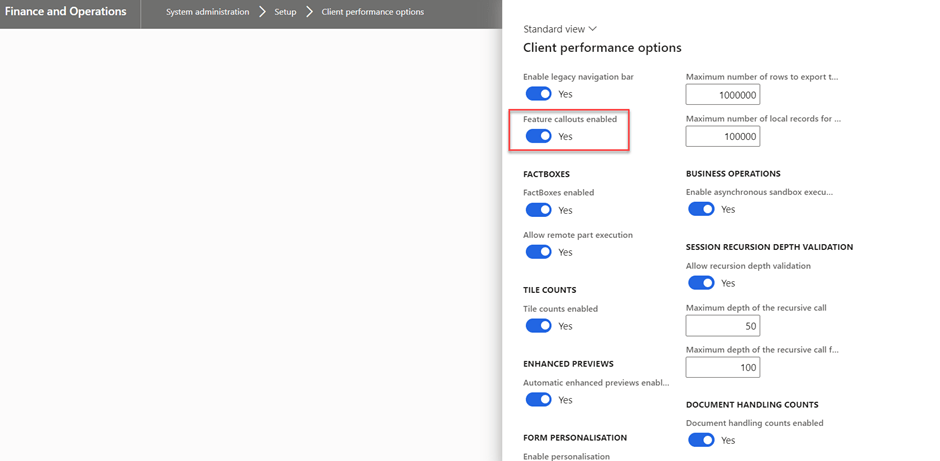
System Administrator can turn off feature callouts for an environment using the Feature callouts enabled option on the Client performance options page.
Multiple feature callouts can be shown on a page at one time. Only one feature callout is allowed per control. If multiple callouts exist, the last one to get triggered will be displayed.
If you want to know more details, check the below link.
https://learn.microsoft.com/en-us/dynamics365/fin-ops-core/dev-itpro/user-interface/feature-callouts
 MOHIT RAMPAL - DYNAMICS 365 F&O BLOG